


As an Amazon Associate, I earn from qualifying purchases. That means I earn commissions from my sponsored links or I make money when readers (you) purchase items through my links. Your purchase allows me to continue working as a stay-at-home dad who moonlights as a farmer and a musician. Needless to say, this post contains affiliate links.

Ok, so, I’m thinking of getting the ASUS ExpertBook Ultra and use it for recording with BandLab, and either my Sonicake Pocket Master or Joyo Jam Buddy II to build a serious recording setup for home and outdoor use.
Because who knows when and where inspiration can strike right?
For those who don’t know, I’m a stay-at-home dad who moonlights as a farmer and a musician. I also work night shifts remotely as an SEO Specialist.
So, my recording sessions happen when all of my chores, responsibilities, tasks, and what have you are done and not because I’ve cleared my schedule for them.
So what I need is a recording setup that’s ready when I am — not the other way around.
In my younger years, I used to have a small makeshift home studio which was a dedicated room, a rack of gear, a small mixing board that still managed to take up most of my oversized desk, and a computer powerful enough to run multiple VST plugins at once without the whole thing grinding to a halt.
I don’t have that luxury anymore.
But I still do want to capture ideas, record demos, layer tracks, and actually finish songs at home.
I make do with what I have right now which is my Sonicake Pocket Master and Joyo Jam Buddy II hooked up to my laptop or cellphone and then use BandLab as my DAW.
This makes my current setup highly portable.
But I find my laptop and definitely my cellphone a bit lacking in performance. So… that’s why I’m gonna need a more powerful laptop soon if I am to continue wth this passion of mine as a songwriter.
Why the ExpertBook Ultra Makes Sense to Me as a Musician
I recently attended the ASUS ExpertBook Ultra grand launch here in Davao City at Dusit Thani and although it is marketed and positioned squarely at business professionals who need maximum performance in minimum weight, I think it can be very beneficial for those individuals with more artistic pursuits.
But the ASUS ExpertBook Ultra is not marketed at musicians.
And I don’t seem t recall any that’s marketed to musicians…
Oh wait… there’s the MacBook Pro with its built in GarageBand.
But we don’t really need much… right?
I mean, here’s what musicians actually need from a laptop: enough processing power to run a DAW without lagging and enough RAM to handle multi-track projects.
Maybe add a good audio output if you don’t have access to external speakers and/or headphones.
Maybe enough battery to survive a full session unplugged so you don’t have to lug around a power supply.
And a light enough chassis that you’ll actually carry it around rather than leave it on a desk.
The ASUS ExpertBook Ultra checks every single one of those boxes — and then some.
It runs on up to an Intel Core Ultra X9 Series 3 processor with up to 50 TOPS NPU, paired with a six-speaker Dolby Atmos audio system. The chassis is magnesium-aluminum alloy with Nano Ceramic Technology, coming in at just under 1kg and only 10.9mm thin.
Tech Specs
Processor – Intel Core Ultra X7 / X9 Series 3 · up to 50 TOPS NPU
RAM – Up to 64GB LPDDR5X
Storage – Up to 2TB PCIe 4.0 SSD
Display – 14″ 3K Tandem OLED · 2880×1880 · 600 nits
Audio – Six-speaker Dolby Atmos · Dual-magnetic woofers · Dedicated tweeters
Battery – 70Wh · Up to 26 hours
Weight – Starting at 0.99kg (2.18 lbs)
Wireless – Wi-Fi 7 · Bluetooth 5.4
The six-speaker Dolby Atmos audio system is genuinely useful for monitoring your mix when you’re not using headphones.
Most laptops don’t have onboard speakers that good and that makes rough mixing well… rough.
The ASUS ExpertBook Ultra’s system features dual-magnetic woofers and dedicated tweeters — that means you’ll actually get good low-end information and high-frequency detail from built-in speakers, which is unusual at any price point.
The 26-hour battery claim means a full session day — or several session nights — without hunting for a charger.
Lotsa Ports Available
These days, laptops don’t seem to have as many ports as they used to have back in the day. The ASUS ExpertBook Ultra doesn’t seem to have that problem despite it being so slim. Check it out:
Thunderbolt 4 (×2)USB-C · One on each side · Full function · Supports class-compliant audio interfaces
3.5mm AudioCombo jack · Headphone out + mic input · Direct monitoring possible
USB-A 3.2 Gen 2 (×2)One on each side · 10Gbps · For USB audio interfaces
HDMI 2.1Full size · For connecting to external monitors or display
The two Thunderbolt 4 ports are the critical connection points for any serious audio interface. Thunderbolt 4 supports class-compliant USB audio, meaning any audio interface that works with USB-C will work here with low latency.
The 3.5mm combo jack gives you a direct headphone output for silent monitoring and a basic line-level input for the simplest possible recording setup. Both matter depending on what gear you’re connecting.
BandLab — Your Free DAW

BandLab is a cloud-based digital audio workstation that runs in your browser or as a standalone application on Windows — and it costs nothing.
Despite it being a free app, it’s actually a very good DAW.
BandLab runs entirely in your web browser through the Mix Editor interface, providing multi-track recording, MIDI programming, virtual instruments, and audio editing tools.
It supports time-stretching, automation, effects processing including reverb, delay, distortion, and EQ, plus VST plugin support for extended capability.
All of your projects save to the cloud automatically, which means you can start a session on the ExpertBook Ultra and continue it from your phone later.
To record guitar through BandLab, you connect your instrument via an audio interface or USB microphone, then select your input device and channel within BandLab’s studio settings.
The workflow is straightforward: create a project, add a guitar track, select your input source, turn on monitoring so you can hear yourself through headphones, and hit record.
Using headphones for monitoring is important. This prevents feedback from your speakers bleeding into the recorded track. On the ExpertBook Ultra, you can plug your headphones into the 3.5mm jack or into the Thunderbolt 4 port via a USB-C adapter, enable monitoring in BandLab, and you’ll hear yourself playing in real time as BandLab records the signal.
Setups
So here’s what I’m thinking, since I have both the Pocket Master and the Jam Buddy II, I’ll come up with a setup for each one based on my needs or preference at that time.
Sonicake Pocket Master
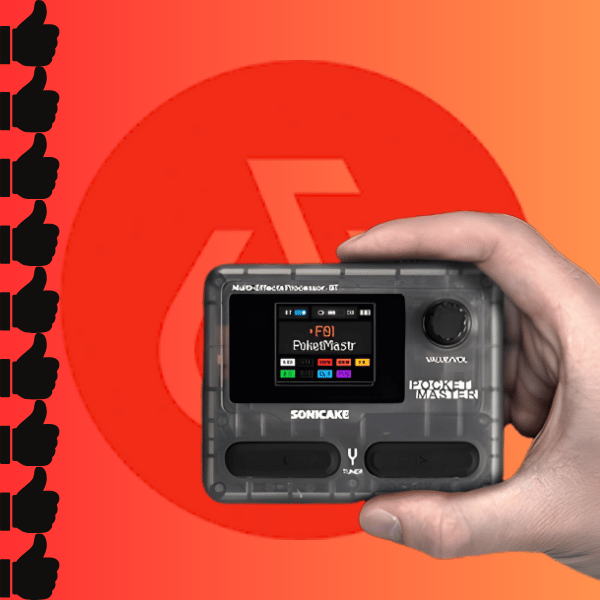
The Sonicake Pocket Master is a strap-mounted pocket amp with USB-C charging, a headphone output, and onboard amp models and effects.
The key connection for recording is the headphone output — a 6.35mm or ¼ inch jack you can turn into a 3.5mm if you have the right attachment that carries the processed guitar signal including whatever amp model and effects you’ve dialed in on the unit.
To record into the ExpertBook Ultra: connect the Pocket Master’s headphone out to the laptop’s 3.5mm combo jack using a 6.35mm to 3.5mm cable, or use a 3.5mm to USB-C adapter into one of the Thunderbolt 4 ports if you prefer that routing.
The easiest would be a USB-C to USB-C data cable since that’s supported by the Sonicake Pocket Master.
The laptop will detect the incoming audio signal.
Open BandLab, create a guitar track, select the appropriate input device — either the laptop’s built-in audio (for the 3.5mm route) or the USB audio adapter — and hit record.
What you’re capturing this way is the fully processed signal from the Pocket Master. Your amp model selection, any drive or modulation or reverb you’ve applied on the unit — all of that goes into BandLab as a single processed audio file.
This is called recording wet, and for demo and songwriting purposes it’s perfectly fine. You get the tone you want directly rather than having to recreate it in post.
The Pocket Master’s onboard amp models cover clean, blues, crunch, and high-gain territory.
Set your tone on the unit, monitor through headphones plugged into the Pocket Master’s headphone out (you’ll need to split the signal with a Y-cable if you want to monitor and record simultaneously through different devices), and let BandLab capture everything.
JOYO Jam Buddy II
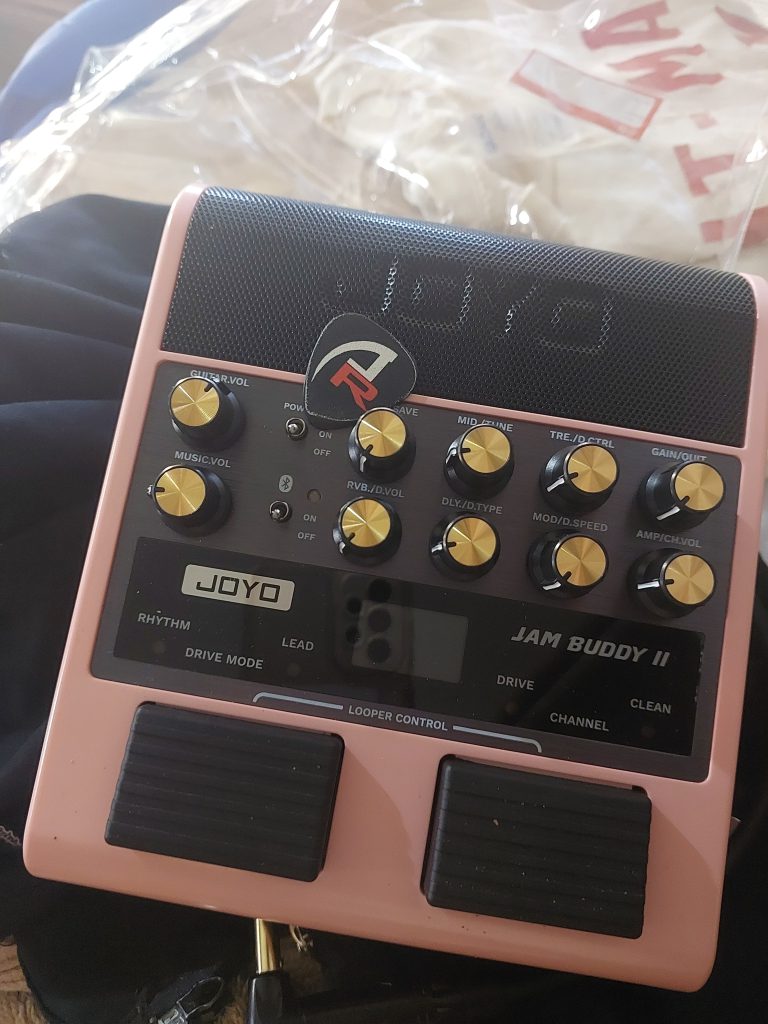
This is the gadget I personally prefer to use and have been using for a while now.
The Joyo Jam Buddy II is a pocket amp with something the Pocket Master doesn’t have: an onboard speaker that let’s you bang out ideas whenever or wherever inspiration hits you.
The Jam Buddy II functions as a proper interface rather than just a headphone source — the signal goes from your guitar through the unit’s onboard processing and out through USB directly into the ExpertBook Ultra as a class-compliant USB audio device.
Connect the Jam Buddy II to one of the ExpertBook Ultra’s Thunderbolt 4 ports via USB-C. Windows will detect it automatically as a USB audio device — no drivers needed. Open BandLab, create a guitar track, and in the input device selection you should see the Joyo Jam Buddy II listed. Select it. Enable monitoring. Record.
The advantage of this routing over the Pocket Master setup is lower latency and cleaner signal quality. Because the Jam Buddy II is sending a proper USB audio signal rather than a 3.5mm headphone output, the ExpertBook Ultra is receiving a cleaner, better-isolated signal with less noise floor.
On the ExpertBook Ultra’s Thunderbolt 4 connection, latency is low enough to monitor in real time without the slight delay that sometimes makes direct monitoring uncomfortable.
The Jam Buddy II has 14 amp models plus built-in effects including delay and reverb. The tone options are more limited than a dedicated multi-effects unit but the quality within those options is solid, and for recording demos and song ideas it covers the main territory most guitarists actually use. This is the setup I’d recommend as the starting point if you own both units.
Pocket Master vs Jam Buddy II · Which Setup Works Better for Recording?
| Factor | Sonicake Pocket Master | Joyo Jam Buddy II |
| Connection to laptop | 6.35mm (1/4 in) out or USB-C | 6.35mm (1/4 in) out or USB-C |
| Signal quality | Good. Analog out may introduce minor noise floor | Better. Digital USB signal, cleaner isolation |
| Latency | Variable depending on adapter and routing | Lower. USB audio class-compliant |
| Amp models | Multiple options with more tonal variety | Limited at 14. To be honest, I only use 3. |
| Setup complexity | Slightly more steps (cable routing, adapter) | Simpler. One USB cable, auto-detected |
| Battery for recording | 3 to 4-hour internal battery, USB-C charged | 5 hours but can also run off USB power from laptop |
| Best for | Players who want more tonal options while recording | Players who want the simplest, cleanest setup fast |
If you own both, start with the Jam Buddy II. The USB-C direct connection to the ExpertBook Ultra’s Thunderbolt 4 port is the cleaner workflow and the lower latency setup. If the Jam Buddy II’s limited amp models don’t cover the tone you need for a specific song, switch to the Pocket Master with the 6.35mm routing — but expect to spend a few extra minutes getting the levels right.
My Recording Workflow
1 – Connect your amp/interface to the laptop/mobile device
The Joyo Jam Buddy II and Sonicake Pocket Master can be hooked up to a laptop or compatible mobile device via 6.35mm, 3.5mm or USB-C. These are usually automatically detected if you have the BandLab app on. Which brings us to the next step.
2 – Open BandLab and create a new project
Open BandLab in Chrome or the mobile app. Click Create → New Project. Give it a name. You’re in the Studio now.
3 – Add a Guitar track and select your input
Click the + button to add a track. Select Guitar. In the track settings, click the input device dropdown and select your connected device — either the Joyo Jam Buddy II (which will appear by name) or your laptop audio input. Select the correct input channel.
4 – Enable monitoring and check your levels
Turn on Monitoring in the track settings. Plug wired headphones into the laptop or the 3.5mm jack on the Jam Buddy II’s headphone out. Play something. Check that the input level meter shows signal without clipping — aim for signal hitting around -12dB to -6dB on peaks, not the red zone.
5 – Turn on the metronome and set your tempo
BandLab has a built-in metronome. Set your BPM before recording so any additional tracks — drums, bass, keys — will sync properly. This step saves hours of editing later.
6 – Record and layer
Hit Record. Play your part. Stop. Listen back. If it’s good, add another track on top — a rhythm part, a lead line, a vocal idea. BandLab handles multitrack recording cleanly and saves everything to the cloud automatically as you work.
7 – Mix, apply effects, and export
Use BandLab’s built-in EQ, reverb, delay, and compression on each track. Mix your levels. When you’re happy with it, export as WAV or MP3. The file downloads directly to the hard drive — or share it directly from BandLab to social media.
Tips for Getting the Best Results
Practical Tips for This Specific Setup
- Use Chrome as your browser. BandLab’s Web MIDI API and audio input work most reliably in Chrome. As a fallback, you can use Microsoft’s Edge. I wouldn’t recommend Safari and/or Firefox because they have been known to have issues with audio input on web-based DAWs. Or maybe that’s just me…
- Close background apps before recording. Even though the ASUS ExpertBook Ultra has enough power for everything, this usually isn’t critical, but closing Spotify, browser tabs with video, and anything else hitting the CPU reduces any chance of audio glitches during takes.
- Set your amp tone before you hit record. Recording wet — with the tone baked in from your Pocket Master or Jam Buddy II — means you can’t change the amp sound in post. Dial in your tone first, record a quick test, listen back, adjust if needed.
- Use the ASUS ExpertBook Ultra’s six-speaker system for rough mixing but do your final mix on headphones. The speakers are good for a laptop but the headphone check will reveal what the speakers are hiding in the low-mid and high frequencies.
- Name your tracks immediately. “Guitar 1,” “Guitar 2 lead,” “Verse riff” — whatever makes sense. BandLab projects can get messy fast if you’re layering multiple takes and you don’t label as you go.
- Use BandLab’s Autosave. It saves to the cloud automatically but also manually save versions of projects you like before making major changes. Projects are free to duplicate and branch from.
- Battery tip: The ExpertBook Ultra’s 26-hour battery means you can record all night without a charger. But if you’re running the Sonicake Pocket Master on its own internal battery simultaneously, charge both before a long session.
Although the ASUS ExpertBook Ultra was not designed with musicians in mind.
The things that make it an excellent business laptop — the processing power, the connectivity, the battery life, the weight — also make it an excellent, highly portable recording laptop.
It can run BandLab without breaking a sweat.
The Thunderbolt 4 ports handle USB audio interfaces cleanly and at low latency.
The six-speaker Dolby Atmos system is actually useful for monitoring and at just under 1kg you can carry the whole recording setup — laptop, pocket amp, guitar cable, headphones — in the same bag as your guitar.
I work night shifts. I record when I can, which is often late and often done as quietly as possible.
This kind of setup — laptop open, Jam Buddy II plugged in, headphones on, BandLab running — is exactly what makes recording possible in a life that isn’t built around having a studio.
The ASUS ExpertBook Ultra is not a cheap machine. But everything else in this setup already sits on my desk. The point is that the right laptop makes all of it actually work, and the ASUS ExpertBook Ultra looks like the right laptop for this.
Get the Gear
These are affiliate links to some of the products listed in this article. It costs you nothing extra to click on these links and buy the products and on the plus side, it helps keep this site going.